I was sent this post by K7 Security on PupyRAT’s latest defense evasion tactics.
There is one IP address listed as the IOC for C2: 103.79.76.40
Shodan has this IP indexed: it has 3 ports open. 22, 80, and 8443, as demonstrated in the screenshot below:
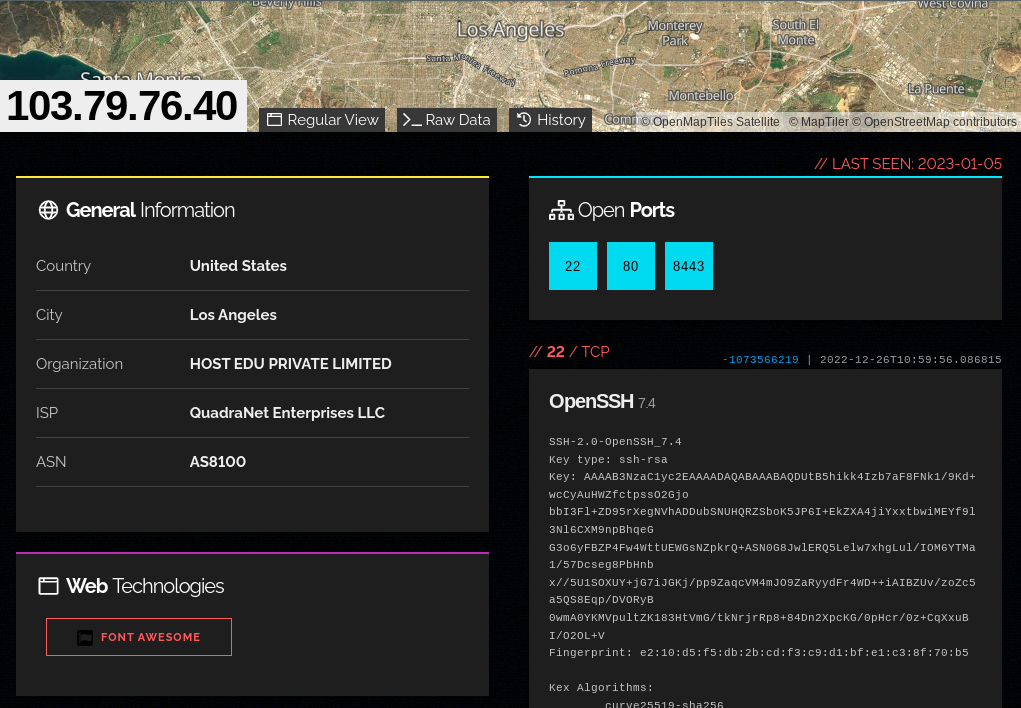
Per the report from K7 Security, port 8443 is the actual C2 port, so that’s where we’ll focus fingerprinting.
Certificate characteristics
Shodan provides the X509 certificate info:
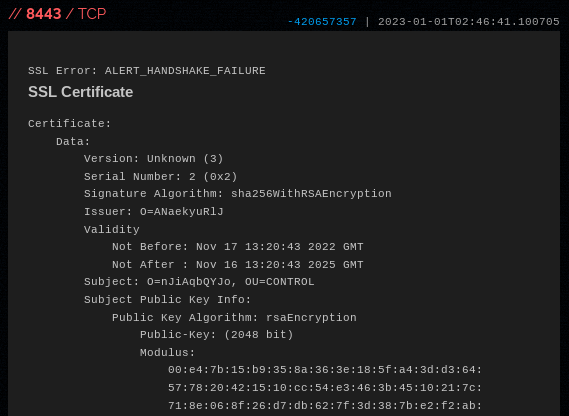
Anything jumping out to you? Take a look at this part: Subject: O=nJiAqbQYJo, OU=CONTROL
The O={randomstring} is definitely interesting, but we can’t run regular expression searches in Shodan to search for similar patterns, unfortunately. Instead, let’s run a search in Shodan:
// Shodan query:
ssl:"OU=CONTROL"
The results are promising! It seems rare that we have this string in an SSL certificate:
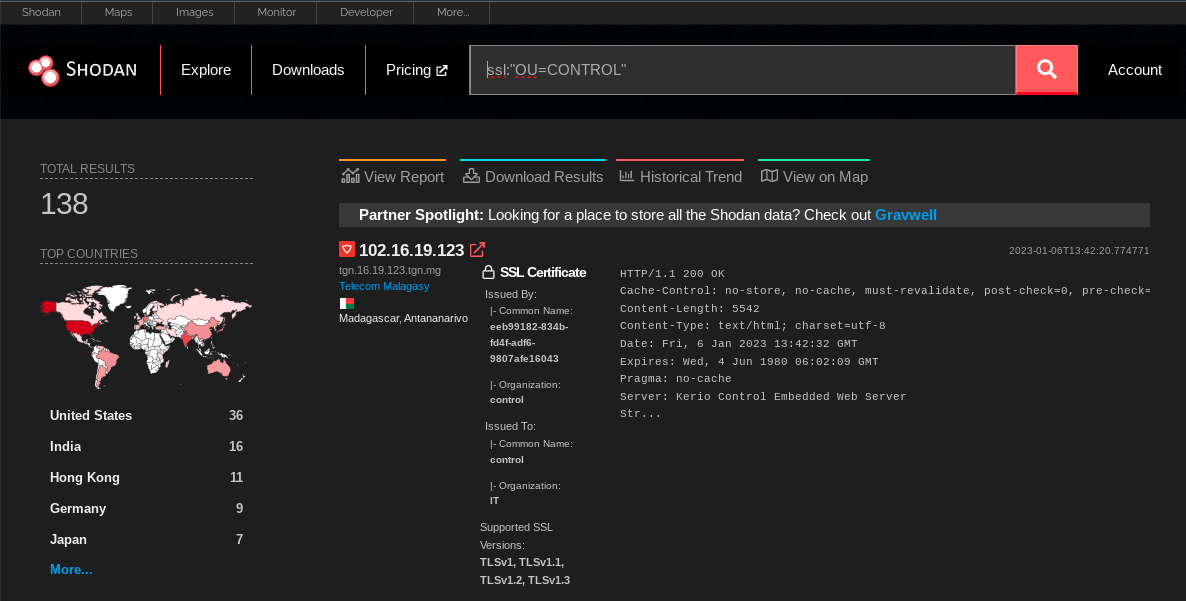
The only problem with the search so far is that it captures certificates with strings like OU=Control Plane or OU=Controller
Refining the search
Going back to the certificate from the original IP above, Shodan actually errors out whilst trying to perform a TLS handshake. At the very top of the screenshot you can see: SSL error: ALERT_HANDSHAKE_ERROR
What if we just add that to our query?
// Shodan query:
ssl:"OU=CONTROL" "ALERT_HANDSHAKE_ERROR"
Voila, we have filtered down to 41 hosts:
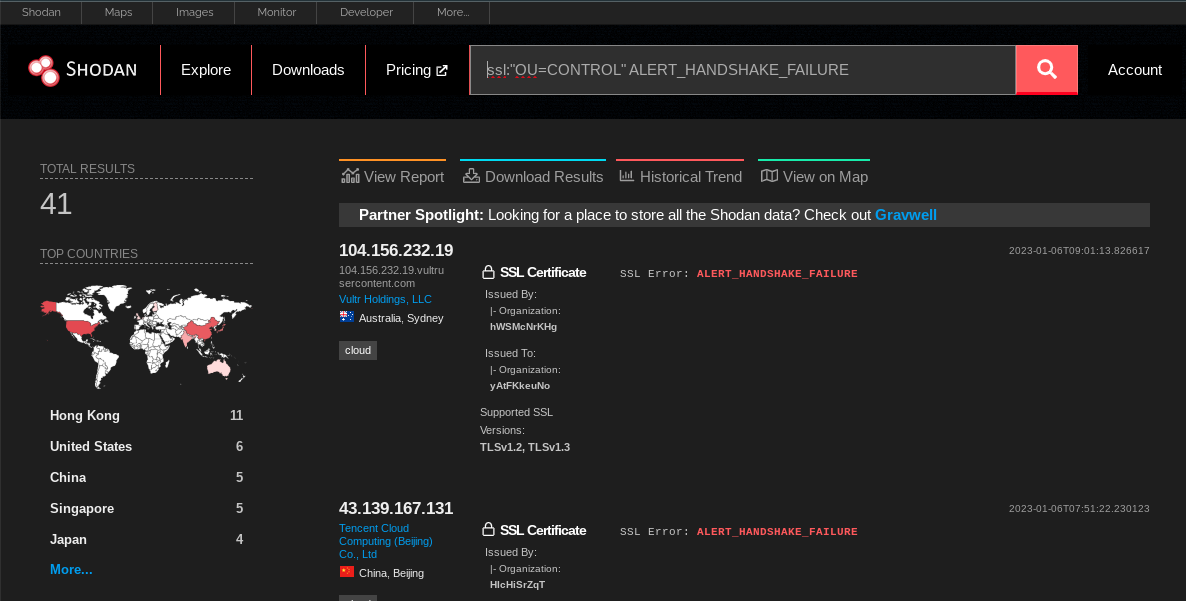
You can see that these two top IPs in the resultant search fit our original IP’s characteristics. Same SSL error, same 10-character random Organisation (O=...) string.
Tuning the search and exploring the indicators
It wouldn’t be good intel without verifying the findings. Based on the original indicator 103.79.76.40, we’ll expect them all to have a random 10-character Organisation string in the SSL certificate.
This section demonstrates usage of Shodan CLI. If you don’t have a Shodan account and want to follow along, you can download a copy of the Shodan data from pupy2.json.gz.
Checking the org of the certificate
# Download the search results for analysis
kmsec@penguin:~/shodan/pupy$ shodan download pupy "ALERT_HANDSHAKE_FAILURE ssl:OU=CONTROL"
kmsec@penguin:~/shodan/pupy$ gunzip pupy.json.gz -k
# extract the Org using jq
kmsec@penguin:~/shodan/pupy$ cat pupy.json | jq .ssl.cert.subject.O
"yAtFKkeuNo"
"zydhwfPhDi"
"KNiZWFLvcu"
#  ....snipped for brevity....
"ANLdMfjAeV"
"vmware.com" #<--- ANOMALY
"ZSRTijyRdY"
#...
One IP 147.139.1.96 matches our query but has O=vmware.com. Whilst it is probably malicious based on my cursory look, it doesn’t match our C2 signature. Let’s remove it for good measure with a new query:
//shodan search
ssl:"OU=CONTROL" ALERT_HANDSHAKE_FAILURE -ssl:.com
Exploring the indicators
Now that we have a tuned query with high-confidence results, let’s see what’s running on these servers.
We have to re-run a Shodan search to get all the running services on these IPs because when you run a search on specific services like ssl:blah, Shodan will only return the data on those ports/services.
# Download our tuned query results
kmsec@penguin:~/shodan/pupy$ shodan download pupy2 "ALERT_HANDSHAKE_FAILURE ssl:OU=CONTROL -ssl:.com"
# gunzip it
kmsec@penguin:~/shodan/pupy$ gunzip -k pupy2.json.gz
# Turn the results into comma-separated values
kmsec@penguin:~/shodan/pupy$ cat pupy2.json | jq .ip_str | sed 's/"//g' | tr '\r\n' ','
8.210.107.120,104.156.232.19,43.139.167.131,154.202.59.194,107.152.38.58,35.241.106.118,167.172.234.140,95.216.206.17,92.118.189.172,65.20.71.101,154.202.59.148,158.247.217.200,50.17.201.44,45.77.41.141,103.79.76.40,103.135.34.69,119.3.245.174,103.155.92.32,103.3.60.167,35.220.154.238,178.236.47.4,202.182.106.252,114.55.60.171,35.201.196.246,154.209.95.8,154.202.59.25,212.115.55.53,43.155.117.195,157.245.155.179,141.164.47.226,45.76.208.215,192.169.7.17,47.94.171.155,157.245.155.179,34.92.149.233,104.168.163.200,192.243.122.156,18.143.135.171,167.179.110.215,77.91.101.173,
# remove the trailing "," for the next step
Whack it into the Shodan query box:
// shodan query:
ip:8.210.107.120,104.156.232.19,43.139.167.131,154.202.59.194,107.152.38.58,35.241.106.118,167.172.234.140,95.216.206.17,92.118.189.172,65.20.71.101,154.202.59.148,158.247.217.200,50.17.201.44,45.77.41.141,103.79.76.40,103.135.34.69,119.3.245.174,103.155.92.32,103.3.60.167,35.220.154.238,178.236.47.4,202.182.106.252,114.55.60.171,35.201.196.246,154.209.95.8,154.202.59.25,212.115.55.53,43.155.117.195,157.245.155.179,141.164.47.226,45.76.208.215,192.169.7.17,47.94.171.155,157.245.155.179,34.92.149.233,104.168.163.200,192.243.122.156,18.143.135.171,167.179.110.215,77.91.101.173
Or for offline analysis using the CLI:
kmsec@penguin:~/experiments/myblog/public$ shodan download ip-data "ip:8.210.107.120,104.156.232.19,43.139.167.131,154.202.59.194,107.152.38.58,35.241.106.118,167.172.234.140,95.216.206.17,92.118.189.172,65.20.71.101,154.202.59.148,158.247.217.200,50.17.201.44,45.77.41.141,103.79.76.40,103.135.34.69,119.3.245.174,103.155.92.32,103.3.60.167,35.220.154.238,178.236.47.4,202.182.106.252,114.55.60.171,35.201.196.246,154.209.95.8,154.202.59.25,212.115.55.53,43.155.117.195,157.245.155.179,141.164.47.226,45.76.208.215,192.169.7.17,47.94.171.155,157.245.155.179,34.92.149.233,104.168.163.200,192.243.122.156,18.143.135.171,167.179.110.215,77.91.101.173"
Search query:                   ip:8.210.107.120,104.156.232.19,43.139.167.131,154.202.59.194,107.152.38.58,35.241.106.118,167.172.234.140,95.216.206.17,92.118.189.172,65.20.71.101,154.202.59.148,158.247.217.200,50.17.201.44,45.77.41.141,103.79.76.40,103.135.34.69,119.3.245.174,103.155.92.32,103.3.60.167,35.220.154.238,178.236.47.4,202.182.106.252,114.55.60.171,35.201.196.246,154.209.95.8,154.202.59.25,212.115.55.53,43.155.117.195,157.245.155.179,141.164.47.226,45.76.208.215,192.169.7.17,47.94.171.155,157.245.155.179,34.92.149.233,104.168.163.200,192.243.122.156,18.143.135.171,167.179.110.215,77.91.101.173
Total number of results:        112
Query credits left:             100000
Output file:                    ip-data.json.gz
  [###################################-]   99%  00:00:01
Saved 112 results into file ip-data.json.gz
kmsec@penguin:~/experiments/myblog/public$ gunzip -k ip-data.json.gz
#.... more analysis
Immediately we get some interesting results!
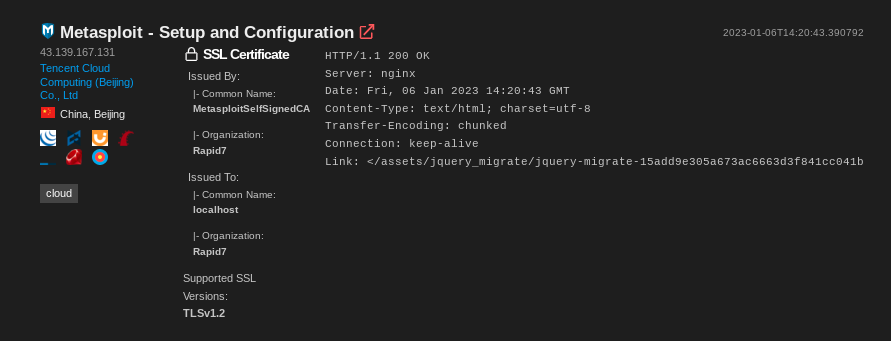
I didn’t dig much further into this dataset. If you’d like to play around with the data, I’ve uploaded ip-data.json.gz for your entertainment.
These IPs are not limited to running PupyRAT and the SSL certificate quirks are not part of the default PupyRAT implementation. This cluster of activity appears to be a specific threat actor group, likely based in China due to the preferred hosting providers and victim profile as mentioned by K7 Security in their original blog post.
Closing thoughts
In less than 20 minutes, I was able to pivot off of an indicator and generate 39 more IOCs to track, block, and share. A brief check of these IPs indicated the majority weren’t tracked by intelligence vendors.
Hopefully you found following along useful and educational.
Indicators
8[.]210[.]107[.]120
104[.]156[.]232[.]19
43[.]139[.]167[.]131
154[.]202[.]59[.]194
107[.]152[.]38[.]58
35[.]241[.]106[.]118
167[.]172[.]234[.]140
95[.]216[.]206[.]17
92[.]118[.]189[.]172
65[.]20[.]71[.]101
154[.]202[.]59[.]148
158[.]247[.]217[.]200
50[.]17[.]201[.]44
45[.]77[.]41[.]141
103[.]79[.]76[.]40
103[.]135[.]34[.]69
119[.]3[.]245[.]174
103[.]155[.]92[.]32
103[.]3[.]60[.]167
35[.]220[.]154[.]238
178[.]236[.]47[.]4
202[.]182[.]106[.]252
114[.]55[.]60[.]171
35[.]201[.]196[.]246
154[.]209[.]95[.]8
154[.]202[.]59[.]25
212[.]115[.]55[.]53
43[.]155[.]117[.]195
157[.]245[.]155[.]179
141[.]164[.]47[.]226
45[.]76[.]208[.]215
192[.]169[.]7[.]17
47[.]94[.]171[.]155
157[.]245[.]155[.]179
34[.]92[.]149[.]233
104[.]168[.]163[.]200
192[.]243[.]122[.]156
18[.]143[.]135[.]171
167[.]179[.]110[.]215
77[.]91[.]101[.]173